
Turn assessment results into unique, personal feedback
An assessment becomes most valuable when people understand what results mean for them or their teams and organizations.
With Brilliant Assessments, one assessment can deliver feedback through interactive Results Dashboards, PDF and Word reports, and automated certificates.
Every subscription includes unlimited reports.
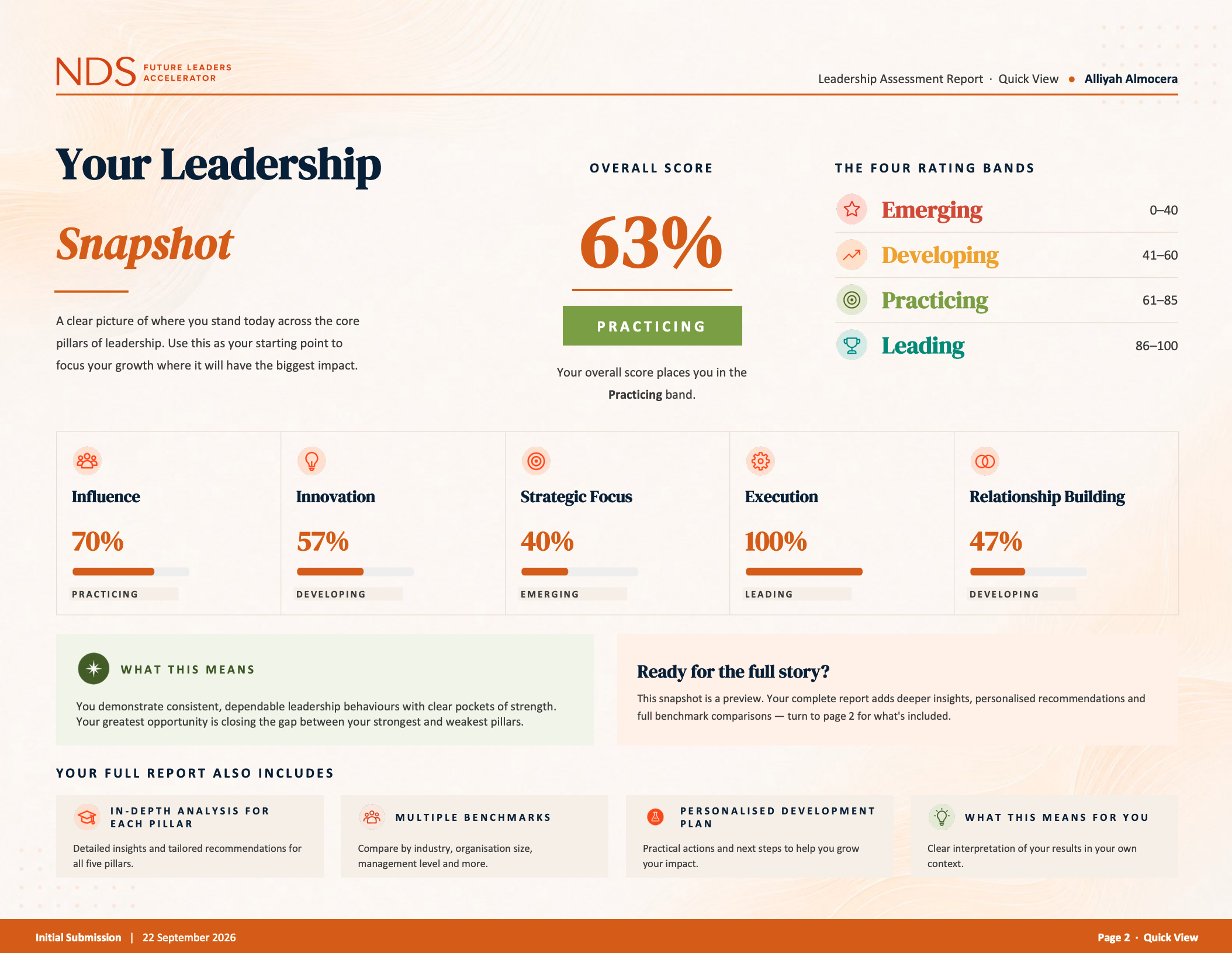
Choose the right experience for every audience
Give people an interactive view they can explore, a report they can keep and share, or a certificate that recognizes what they have achieved.
Give people results they can explore
Create live, branded feedback experiences with charts, personalized content, filters and drilldowns.
Build views for individuals, teams and whole programmes from the same assessment data.
Deliver feedback they can keep and use
Produce polished PDF reports or editable Word documents containing the scores, charts, explanations and recommendations relevant to each reader.
Deliver them automatically, make them available after completion or produce them when you are ready to share the results.
Recognize achievement automatically
Issue branded certificates for training, compliance, accreditation, professional development or skills programmes.
Set the criteria someone needs to meet and deliver the appropriate certificate when they achieve it.

Give each audience the view they need
The same assessment can support different conversations. An individual may need personal recommendations, while a manager, client or programme leader needs to understand the wider picture.
Help individuals understand their result
Turn scores into useful explanations, strengths, priorities and next steps. Use answers, rating bands and other assessment data to determine the feedback each person receives.
Bring teams and cohorts together
Combine individual responses to reveal shared strengths, gaps, differences and areas that may need attention across a group.
See the wider programme
Compare departments, clients, cohorts or assessments and follow how results develop as your programme grows.
Create different feedback for respondents, assessors, managers and clients without rebuilding the assessment for each audience.
Help people see what matters
Use charts, heatmaps, score summaries, rating bands and tables to show strengths, gaps and patterns without expecting the reader to interpret raw assessment data.
Focus attention
Use colors, visual score bands and concise summaries to show where performance is strong and where further attention may be needed.
Reveal the wider pattern
Bring categories, competencies, questions, roles or respondent groups together to uncover differences that one overall score may hide.
Explore the detail
Add filters and drilldowns to Results dashboards so people can begin with a high-level view and open the information that is relevant to them.
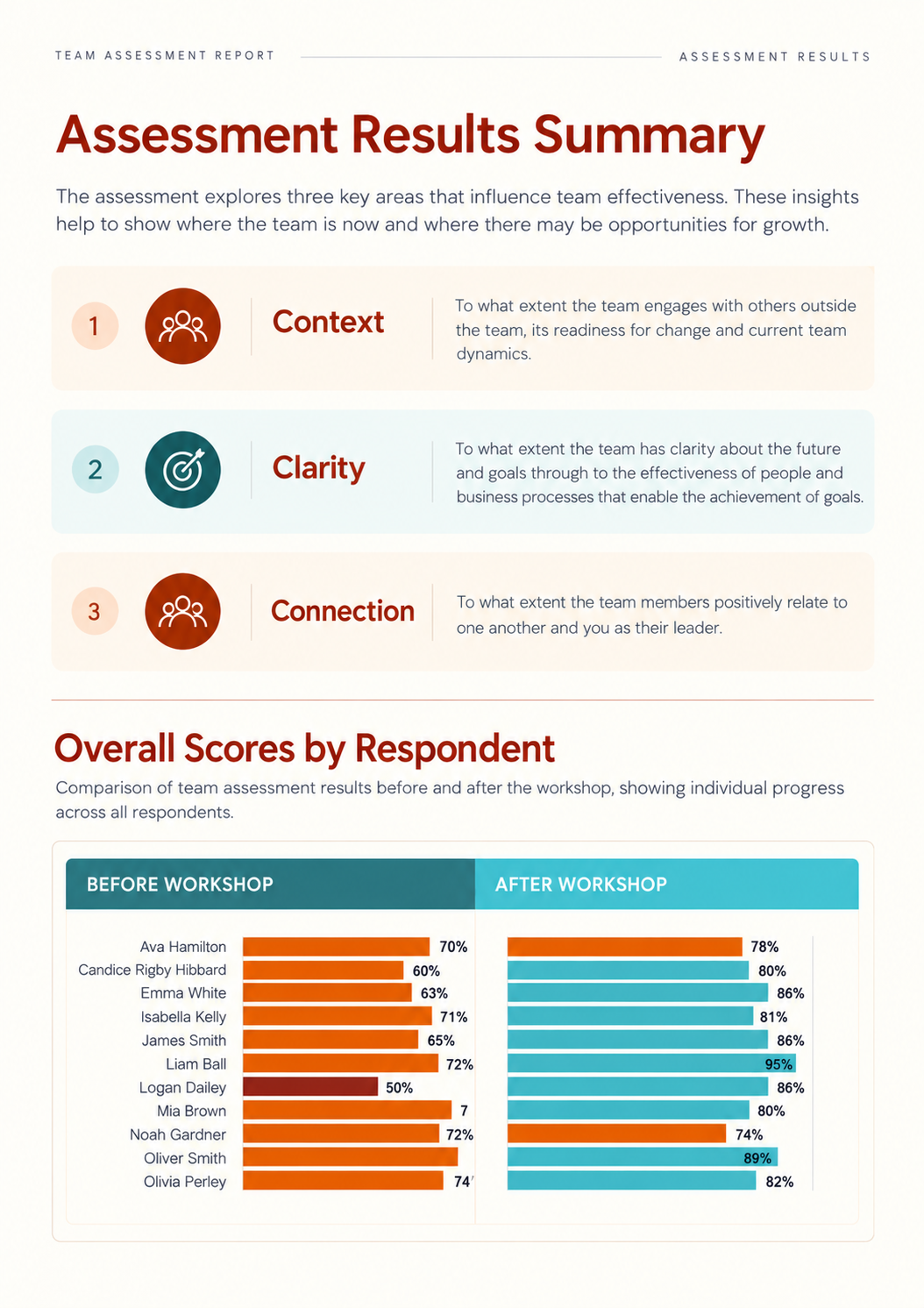

Give every score context
A result becomes more meaningful when people can compare it with a relevant standard, group or earlier assessment.
Benchmark performance
Compare an individual, team or organization with an average, a chosen percentile, a high-performing group or a standard you define.
Create more relevant comparisons using information such as role, department, sector, location or programme.
Compare teams and groups
Show how departments, business units, roles, clients or other groups differ while retaining the overall view.
Track progress over time
Bring repeat assessments together to show what changed, what stayed the same and where further work may be needed.
Compare the first and latest result, create a before-and-after view or follow progress across several assessment cycles.